Lovable builds the checkout in a minute. The part that takes three days is finding out what happens when the card is declined, or when the webhook arrives twice.
You can test that from inside Lovable chat. Custom MCP servers are chat connectors, so the agent that wrote the code can also exercise it against an API twin that misbehaves on purpose. The connector requires a FetchSandbox API key. "No authentication" in Lovable's form will not work.
Short answer
Create a key at fetchsandbox.com/keys. In Lovable's Add MCP server form, set the URL to https://fetchsandbox.com/mcp/v1 and choose Bearer token or API key. Paste the key. Then ask the agent to boot a twin, arm a failure, and run the same flow again. Check the end state, not the HTTP 200.
Get a FetchSandbox API key
Sign in at fetchsandbox.com/keys. Click Create another key. Copy the secret immediately — the list later only shows a prefix like fsk_…. The page tells you to paste it wherever a tool asks for a bearer token, or to set FETCHSANDBOX_API_KEY.
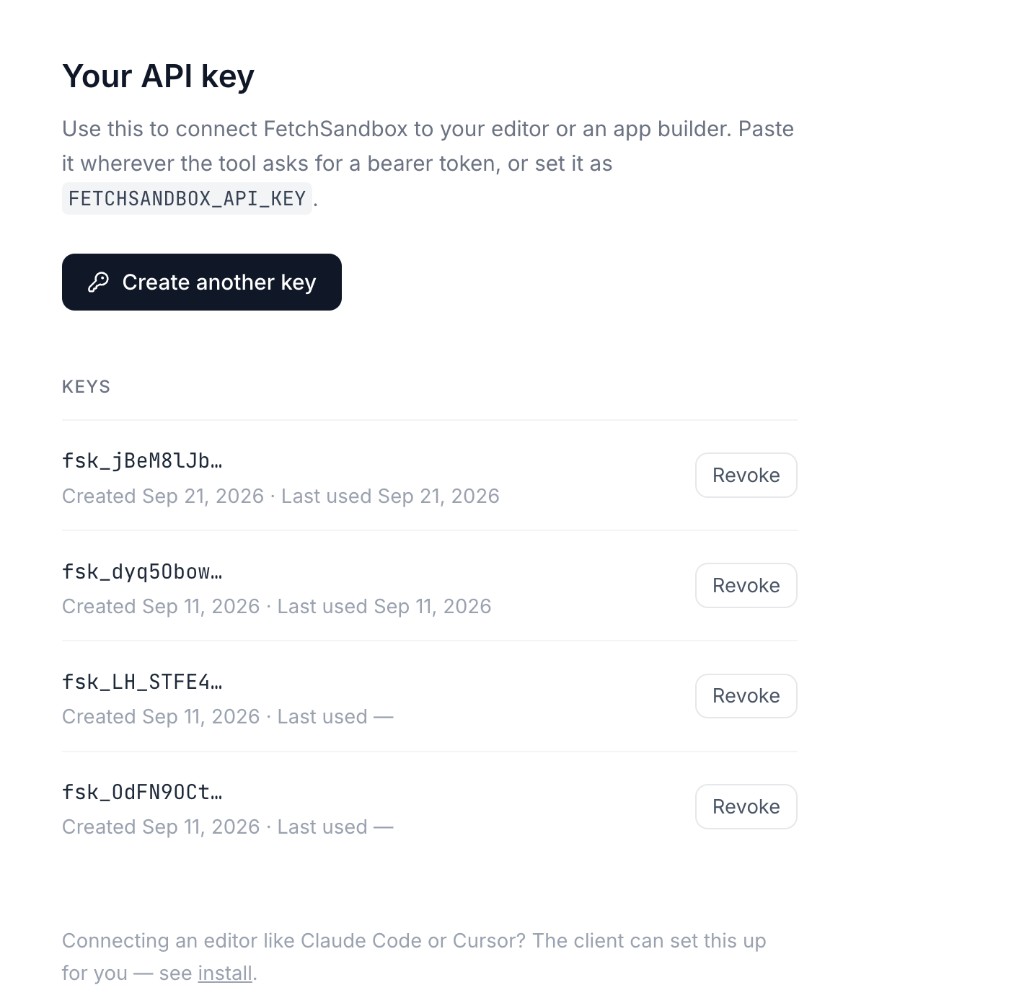
Do not paste the key into Lovable chat. It belongs in the connector's bearer field only.
Add the connector
- Open
https://lovable.dev/dashboard?connectors - Click + and choose MCP server
- Fill the form to match this:
| Field | Value |
|---|---|
| Server name | FetchSandbox |
| Server URL | https://fetchsandbox.com/mcp/v1 |
| Authentication | Bearer token or API key (not OAuth, not None) |
| Token | the fsk_… secret from /keys |
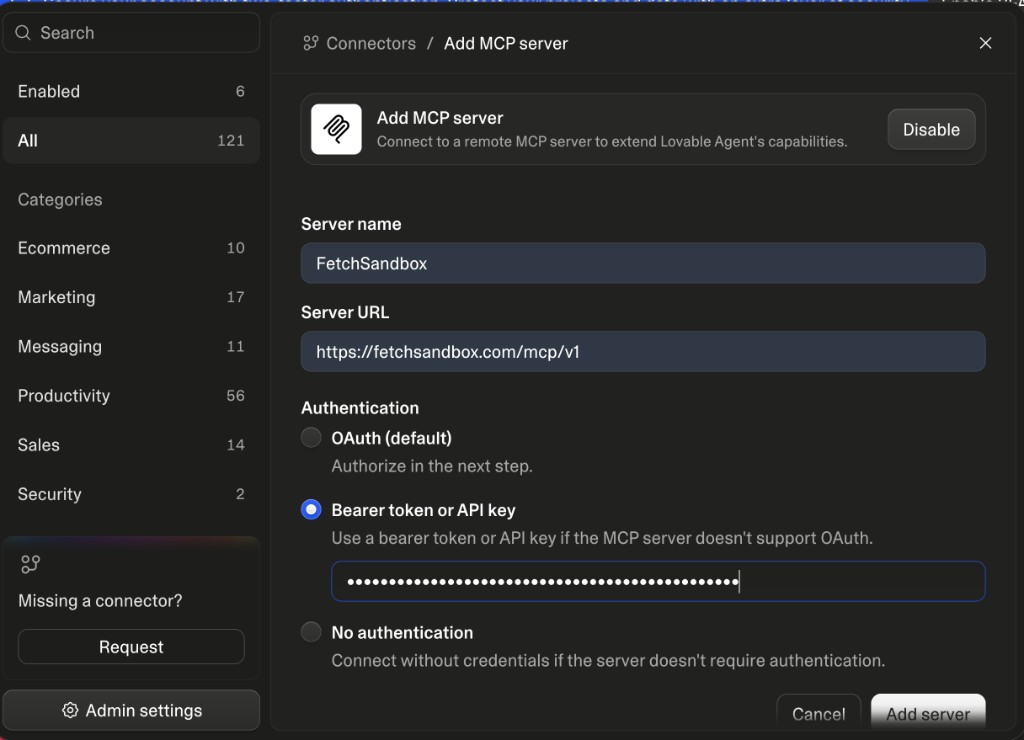
Then Add server. If MCP server is greyed out, a workspace admin has disabled custom servers.
Lovable offers OAuth and No authentication on the same screen. FetchSandbox's hosted MCP forwards Authorization to the backend. No bearer means a 401, and the 401 tells you to go to /keys. Chat connectors are personal to you and never part of your published app.
If an older workspace still shows a connection type, pick the HTTP / direct option — this endpoint is streamable HTTP, not SSE.
Boot a twin
Spin up a Stripe test environment and run a payment through it.
You get a sandbox id, a base URL and an API key. Point your app's Stripe base URL at it and your existing code runs unchanged — same paths, same status codes, same error envelope.
Break it on purpose
A checkout that passes on the happy path tells you almost nothing.
What failure scenarios can this sandbox inject?
For Stripe that includes payment_declined, webhook_retries, rate_limited, slow_network, and two almost nobody tests: replayed_old_signed_event and signed_event_with_mutated_body.
Arm webhook_retries and run the checkout again.
Webhooks go to a URL you register, signed the way the provider signs them: HMAC over the raw body, provider header format, real tolerance window. A handler that checks the signature but ignores the timestamp passes manual testing and fails replayed_old_signed_event.
Check the end state
The common wrong conclusion is that the call returned 200, so the code handled it. Ask instead:
- A declined payment must not produce a confirmed order.
- A webhook delivered twice must not charge twice or send two receipts.
Each run returns a share_url — a replayable timeline of every request, response and webhook event. That is what goes in the pull request.
Start with the failure your users would notice first. For a storefront, that is the duplicate charge.
Questions about the Lovable MCP connector
Do I need a FetchSandbox API key?
Yes. Create one at fetchsandbox.com/keys and paste it as the Lovable bearer token. The key is mandatory.
Can I pick No authentication in Lovable?
No. That option is on the form, but the hosted MCP endpoint expects Authorization. Without a key you get 401 and a pointer back to /keys.
Where does FETCHSANDBOX_API_KEY go?
In Lovable, it goes in the connector's Bearer token or API key field, not in chat and not in your published app secrets. Cursor and Claude Code can use the same secret as FETCHSANDBOX_API_KEY — see install.
The full build-then-inject walkthrough, including the Ironworks gym prompt, is How to Build a Lovable App and Verify Integrations with FetchSandbox.