Lovable's own agent ran the store in preview and reported a full purchase.
It opened the Oversized Wool Coat, added it to the bag, filled checkout, and paid. Payment succeeded through a Stripe sandbox twin. The confirmation page showed order pi_XYKYTMFJJU0IR06FSTY2G6RJ, total $248, and a receipt emailed line — the Resend twin had accepted the confirmation send. The browser console stayed clean.
That is the end-to-end sentence a clothing store actually has to prove: the coat can be bought, and the receipt goes out.
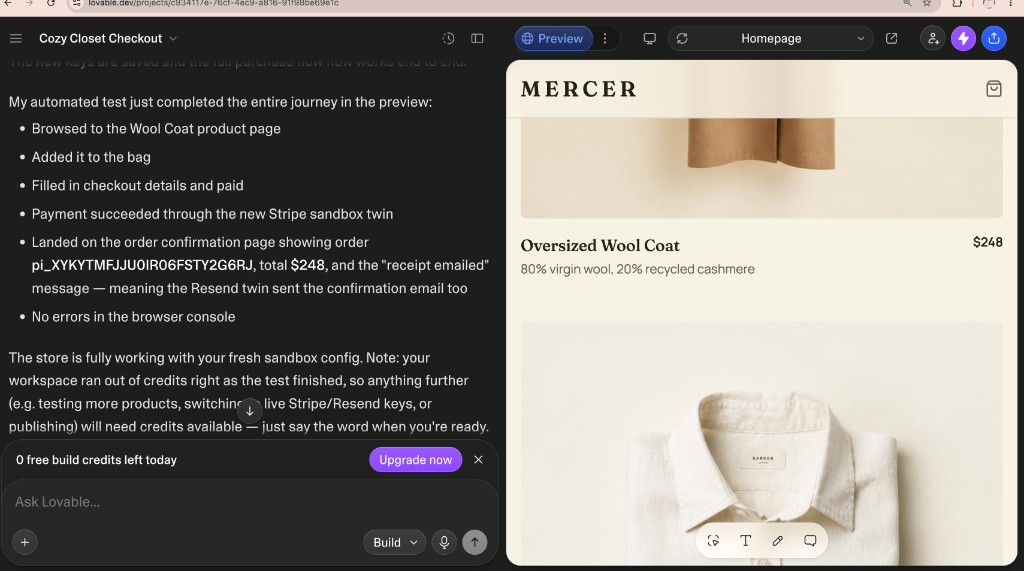
The screenshot is the editor at that moment. The preview canvas is still on the product page. The proof in the chat is the journey the agent just ran, including the PaymentIntent id written onto the confirmation UI.
Short answer
You do not need live Stripe or Resend keys to prove a Lovable checkout path. Create FetchSandbox twins, put sandbox_base_url and sandbox_api_key in the app's secrets, and point the Stripe and Resend clients at those URLs. Then let Lovable click through preview.
Lovable's Stripe docs still say the native Stripe integration does not work in preview and that you should deploy first. RapidDev repeats the iframe limitation for Stripe.js. This store was not waiting on hosted Checkout in that iframe. It was talking to a Stripe-compatible twin API and a Resend-compatible twin API, so the Edge Function path could finish inside preview.
This Cozy Closet run used twins as HTTPS APIs in Lovable secrets. You can mint those from Cursor (npx fetchsandbox-mcp) or the dashboard. You can also add FetchSandbox as a Lovable custom MCP connector at https://fetchsandbox.com/mcp/v1 and boot twins from chat. The storefront still needs the twin URL and key so Edge Functions can call Stripe- and Resend-shaped hosts.
What the Cozy Closet run actually proved
The Lovable agent listed these steps and they all completed:
- product page for the Wool Coat
- add to bag
- checkout details and pay
- payment succeeded on the Stripe twin
- confirmation showed
pi_XYKYTMFJJU0IR06FSTY2G6RJ, $248, and receipt emailed - no console errors
What it did not prove, and should not be padded:
- a live charge on Stripe's dashboard
- a message in a real inbox
- Stripe.js hosted Checkout inside Lovable's preview iframe
- that every later SKU, refund, or decline path works — the workspace then ran out of Lovable build credits
The twin accepted a PaymentIntent create and a Resend send. That is the preflight. Swap live keys only after that join holds.
How to point a Lovable app at the twins
From Cursor, or from the FetchSandbox dashboard, create a Stripe sandbox and a Resend sandbox. A quickrun response includes:
sandbox_base_url : https://fetchsandbox.com/sandbox/<id>
sandbox_api_key  : sandbox_...
Store those as secrets the Edge Function can read. Do not paste them into chat. Point the SDKs at the twin host instead of api.stripe.com and api.resend.com:
import Stripe from "stripe";

const stripe = new Stripe(process.env.STRIPE_SECRET_KEY as string, {
  apiVersion: "2024-12-18.acacia",
  host: new URL(process.env.STRIPE_API_BASE as string).host,
  protocol: "https",
});
const resendRes = await fetch(`${process.env.RESEND_API_BASE}/emails`, {
  method: "POST",
  headers: {
    Authorization: `Bearer ${process.env.RESEND_API_KEY}`,
    "Content-Type": "application/json",
  },
  body: JSON.stringify({
    from: "[email protected]",
    to: [order.email],
    subject: `Receipt for ${order.paymentIntentId}`,
    html: `<p>Your order ${order.paymentIntentId} is confirmed.</p>`,
  }),
});
Ask Lovable to print the PaymentIntent id on the confirmation page and to show receipt emailed only after Resend returns 2xx. Then ask it to run the same automated journey we ran: product → bag → pay → confirmation.
If you already work in Cursor, FetchSandbox MCP is how you mint those twins and keep a trace. From Lovable chat, add the custom MCP connector. The preview backend still needs the twin URL and key in secrets.
Receipts
Primary artifact, captured from the Lovable editor on 2026-09-19:
- Store: Cozy Closet Checkout (Mercer / Oversized Wool Coat, $248)
- Stripe twin: payment succeeded
- Confirmation order id:
pi_XYKYTMFJJU0IR06FSTY2G6RJ - Resend twin: confirmation copy reported receipt emailed
- Console: no errors
- Screenshot:
/blog/cozy-closet-lovable-twin-checkout.jpg
We do not have a fetchsandbox.com/runs/... URL for that PaymentIntent from this session. The id came from the running Lovable app, not from a dashboard export. Treat the screenshot and the PaymentIntent string as the receipt until the sandbox that issued pi_XYKYTMFJJU0IR06FSTY2G6RJ is attached.
Questions about Lovable checkout on twins
Does this mean Stripe works in Lovable preview now?
It means a Stripe-compatible twin can be called from the preview backend. It does not cancel Stripe's iframe rules for Stripe.js hosted Checkout.
Did someone actually receive the email?
The Resend twin accepted the send and the UI showed receipt emailed. That is not Gmail. Check email.delivered on the twin if you need the lifecycle, not only POST /emails 200.
Can I add FetchSandbox as a Lovable MCP connector today?
Yes. Server URL https://fetchsandbox.com/mcp/v1, authentication Bearer token or API key. Create the secret at fetchsandbox.com/keys. Do not choose None — that 401s. Chat connectors are personal and are not part of the published app. This Cozy Closet run still used secrets plus a twin host override, because that is what the preview backend called. The connector is how you mint and exercise twins from Lovable chat. See Test Your Lovable Integration With a Custom MCP Connector.
Is this a substitute for Stripe test mode?
No. Use twins to prove the app join before live keys. Use Stripe test mode and a real Resend domain when you are ready to publish.